Free · Windows 10 or 11 · version 1.2.0
BassDeck: sort your songs, make the beat, mix the set.
A free DJ app, beat maker and audio editor in one window. Your songs in a library that knows each one's tempo and key, two decks with hot cues, loops, key lock and effects, a mixer with headphone cue, a beat maker to make your own tracks, and an editor to trim and fade the result and send it to BassReel as the sound track of your video. It is free: no key, no trial, no account.
BassDeck-Setup-1.2.0-online.exe, 3.6 MB: it downloads the rest, about 160 MB, while it installs · Installs for your Windows account only
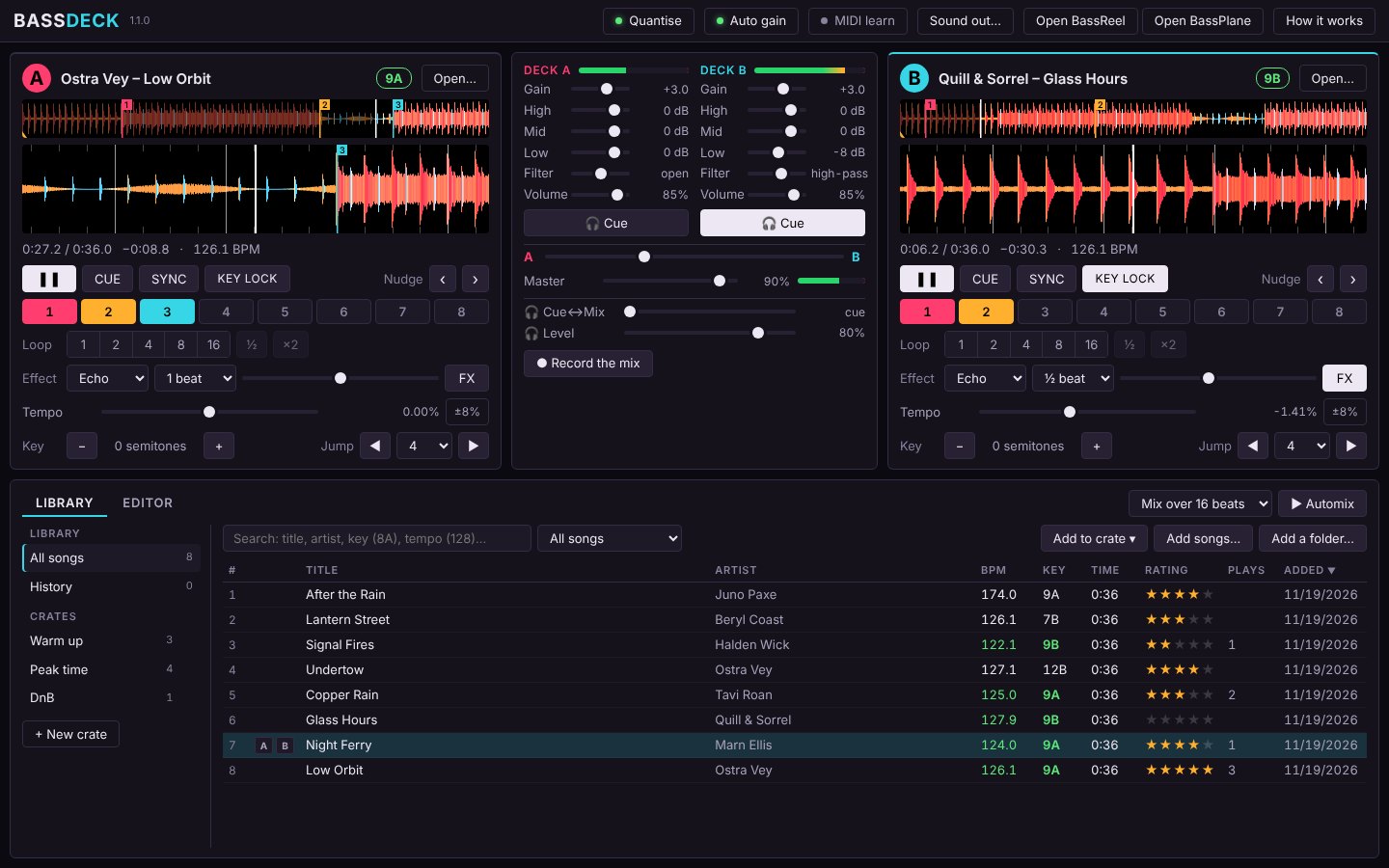
The library
Add your songs, or a whole folder of them. BassDeck listens to each one once, in the background, for its tempo, its key and how loud it is, and keeps them for next time.
- Search by title, artist, key (8A) or tempo (128), and sort by any column.
- Crates: lists in your own order, for a set, a mood or a gig. Drag songs onto one.
- Mixes with deck A shows only the songs whose key fits and whose tempo is close to what is playing (Camelot keys, in green).
- Ratings, how often each song was played, and a History of your set.
- Double-click a song, or drag it onto a deck.
The decks
Each deck shows the whole song and a close view that runs past the playhead, coloured by bass, middle and treble, with the beats and bars marked.
- Play, Cue and Sync (the other deck's tempo, and its beat when both are playing).
- Eight hot cues, kept with the song. Quantise puts cues and loops on the beat.
- Loops of 1 to 16 beats, halved or doubled; beat jump; nudge.
- Key lock keeps a song in its key while its tempo changes; Key − + moves it a semitone.
- An effect on each deck, timed to its beat: Echo, Reverb, Flanger, Phaser, Crush and Gate.
- Tempo range ±8, 16 or 50%.
The mixer
- For each deck: gain, a three-band EQ (a band turned all the way down is off), a filter, volume and a meter.
- Auto gain brings every song in at the same loudness.
- Headphone cue: listen to the next song before the room hears it, on a second output or a sound card with a headphone socket, or on one output with a split cable.
- MIDI learn: play it from your DJ controller. Click a control, move a knob, done.
- Automix plays a crate, one song into the next, in time.
- Record the mix keeps what you hear: save it, edit it, or send it on.
The beat maker
The Beats tab makes a beat from nothing, the way pattern-based beat makers do, and plays it through the mixer.
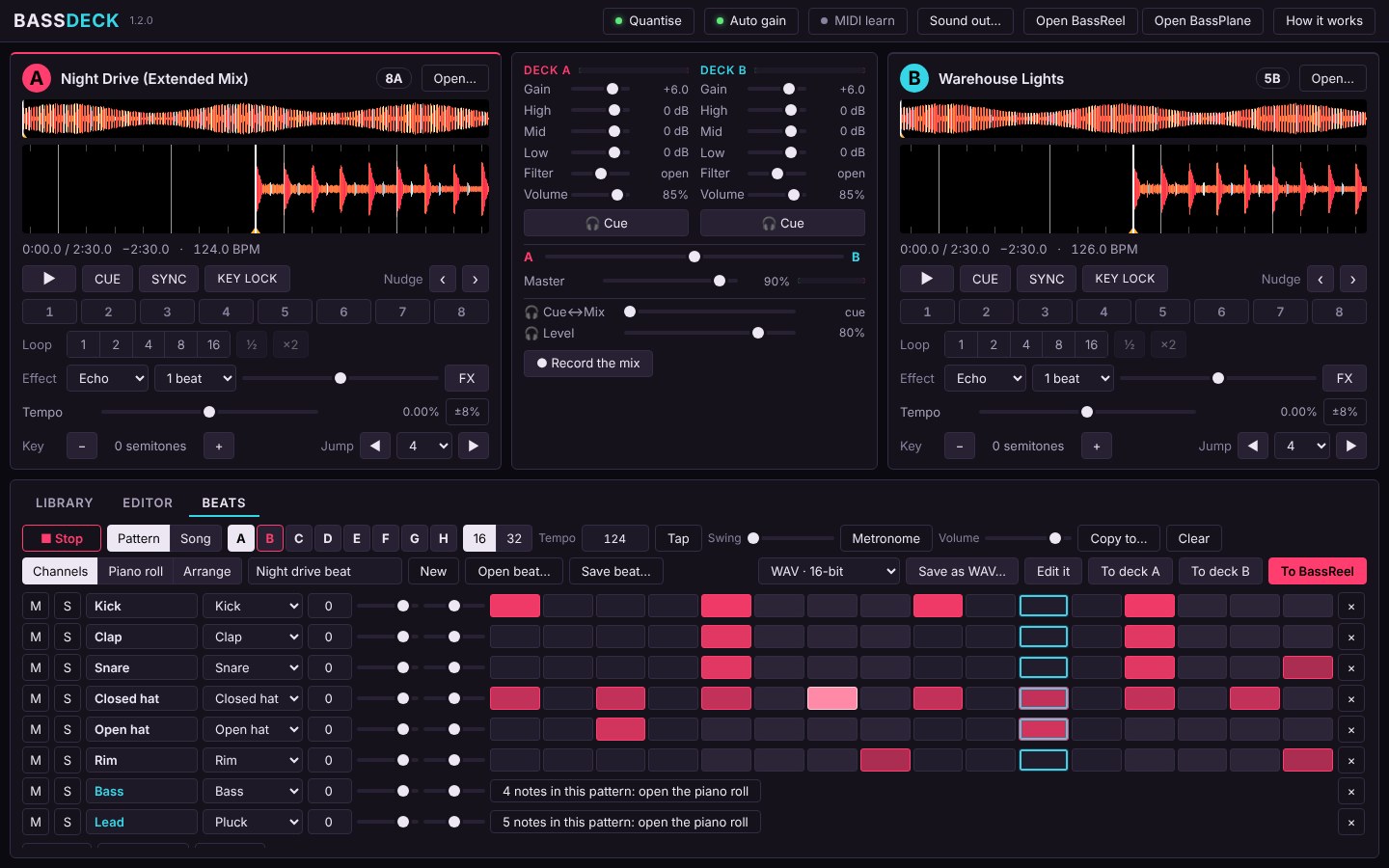
- Channels: drums made in the app (kick, snare, clap, closed and open hat, tom, rim, cowbell, shaker, crash), your own samples, and synths (bass, 808 bass, lead, pluck, pad, keys). Each has 16 or 32 steps, accents and soft hits, mute, solo, volume, pan and pitch.
- A piano roll for the synths' notes: click to put one in, drag to make it longer or move it.
- Patterns A to H, and Arrange to lay them out bar by bar into a song. Tempo, tap tempo, swing and a metronome.
- When it is done: Save as… a file, put it on deck A or B at its exact tempo to mix it with a song, open it in the editor, or send it to BassReel as the sound track. Save beat… keeps the beat itself, to work on later.
The editor
Drag across the wave to choose a part of the song. Then:
- Trim keeps only that part; Delete takes it out; Silence mutes it without moving anything.
- Fade in and Fade out, over the part or the ends of the song.
- Louder, Quieter and Normalise (as loud as it goes without distorting).
- Reverse, Copy and Paste, on either deck.
- Undo takes back the last eight edits. Save as… keeps the result: WAV (16 or 24 bit), FLAC (the same sound in about half the size) or Opus (small), and M4A on computers that have an AAC encoder.
The three apps, connected
- In BassReel, Edit in BassDeck (Sound tab) opens the video's song on a deck.
- In BassDeck, To BassReel brings the edited song, or your recorded mix, back as the sound track.
- In BassPlane and BassReel, File → Send this show to… hands the show to the other one: what was made for the wall becomes a video, and back.
Good to know
- It opens MP3, WAV, M4A, OGG, FLAC and AIFF, and saves WAV, FLAC and Opus (and M4A where Windows has its AAC encoder).
- Keys for everything: Space plays, Q cues, S syncs, 1 to 8 are the hot cues. How it works in the app lists them all.
- Everything happens on your computer. BassDeck sends nothing anywhere: your library stays on your computer.
The installer is new and not signed yet. Chrome may say the file “isn't commonly downloaded”: choose Download suspicious file. Windows SmartScreen warns the first time: choose More info, then Run anyway.